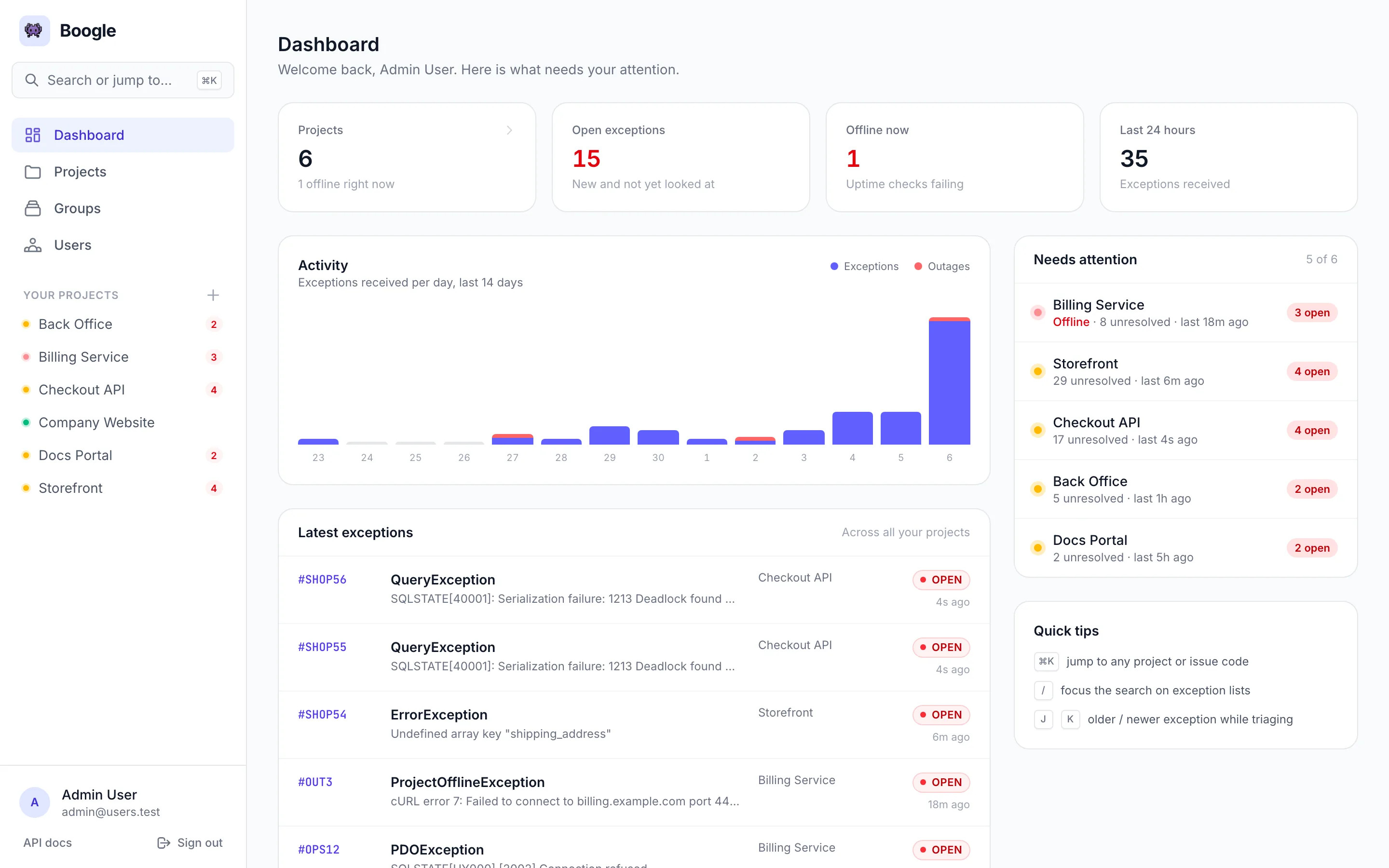
Real screenshots from a Boogle instance running the bundled demo data.
Take the tour →
Self-hosted exception tracker and uptime monitor for Laravel apps. Real-time ingestion, issue codes, digests, and outage alerts — on your own infrastructure.
Everything you need to monitor exceptions and uptime — without SaaS billing or vendor lock-in.
POST /api/log accepts the full client exception payload — HTTP
context, user, stack — persisted as raw_exception with mapped columns and processed on the queue.#BUG42 or #SHOP7 from group prefixes,
with outages always mapped to #OUT. Paste a code anywhere to jump straight to it.ProjectOfflineException on failure,
auto-recovery to DONE, email alerts for outage and restore, 30-day and 3-hour charts./e/{hash}./api/docs.config/boogle.php / .env.andreapollastri/boogle-client wires Laravel 9–13 apps to your Boogle instance
in a few lines.What working with Boogle looks like. Every screenshot comes from a real instance seeded with the
bundled demo data — the latest exceptions were sent through POST /api/log and processed by the
queue worker.
Health, open exceptions and a 14-day sparkline per project. Filter instantly with /, narrow by group, and jump straight into triage from each card.
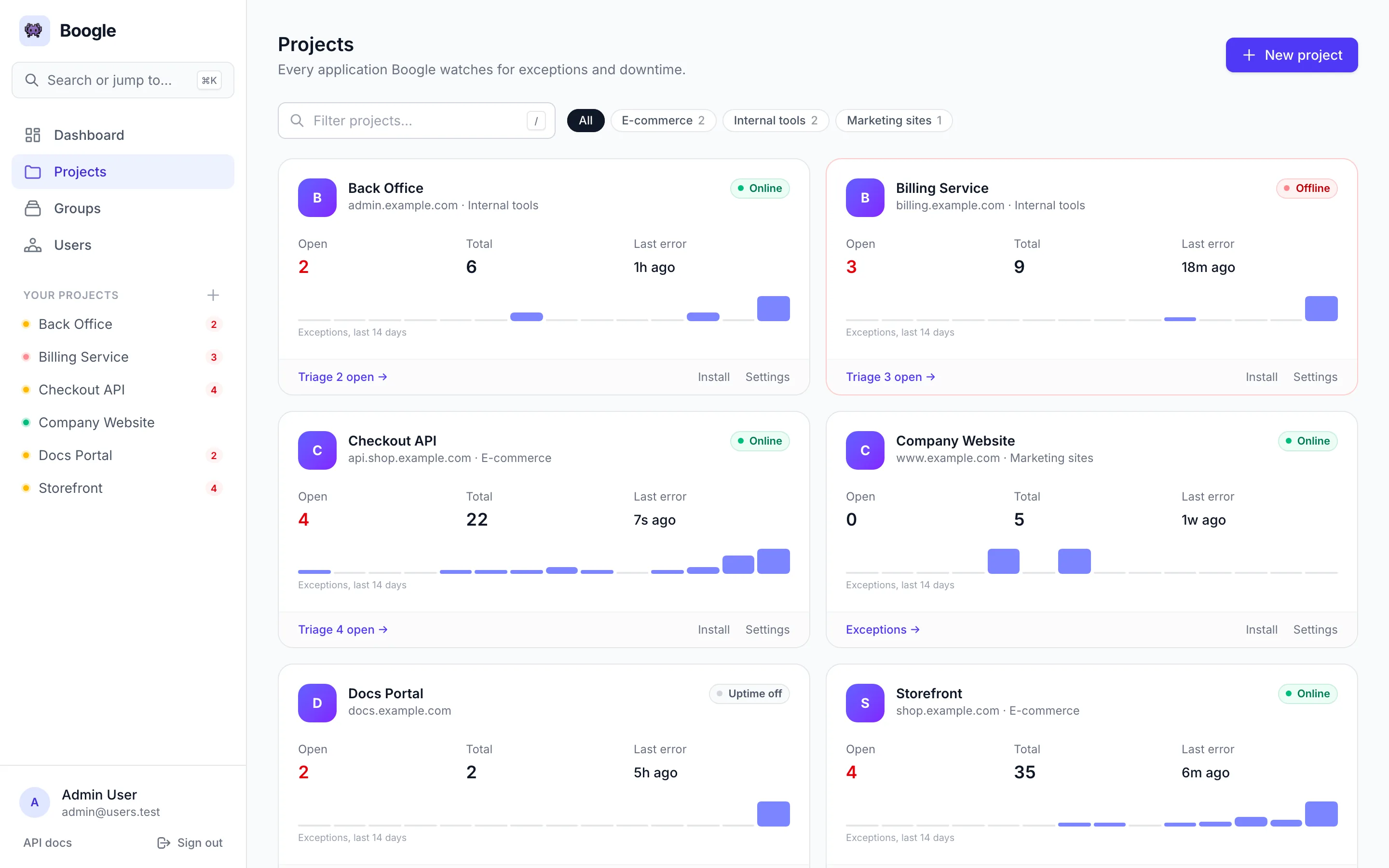
Overview, Exceptions, Installation and Settings live behind the same tabs on every project page. The overview lists what is still unresolved next to uptime, the project key and the team.
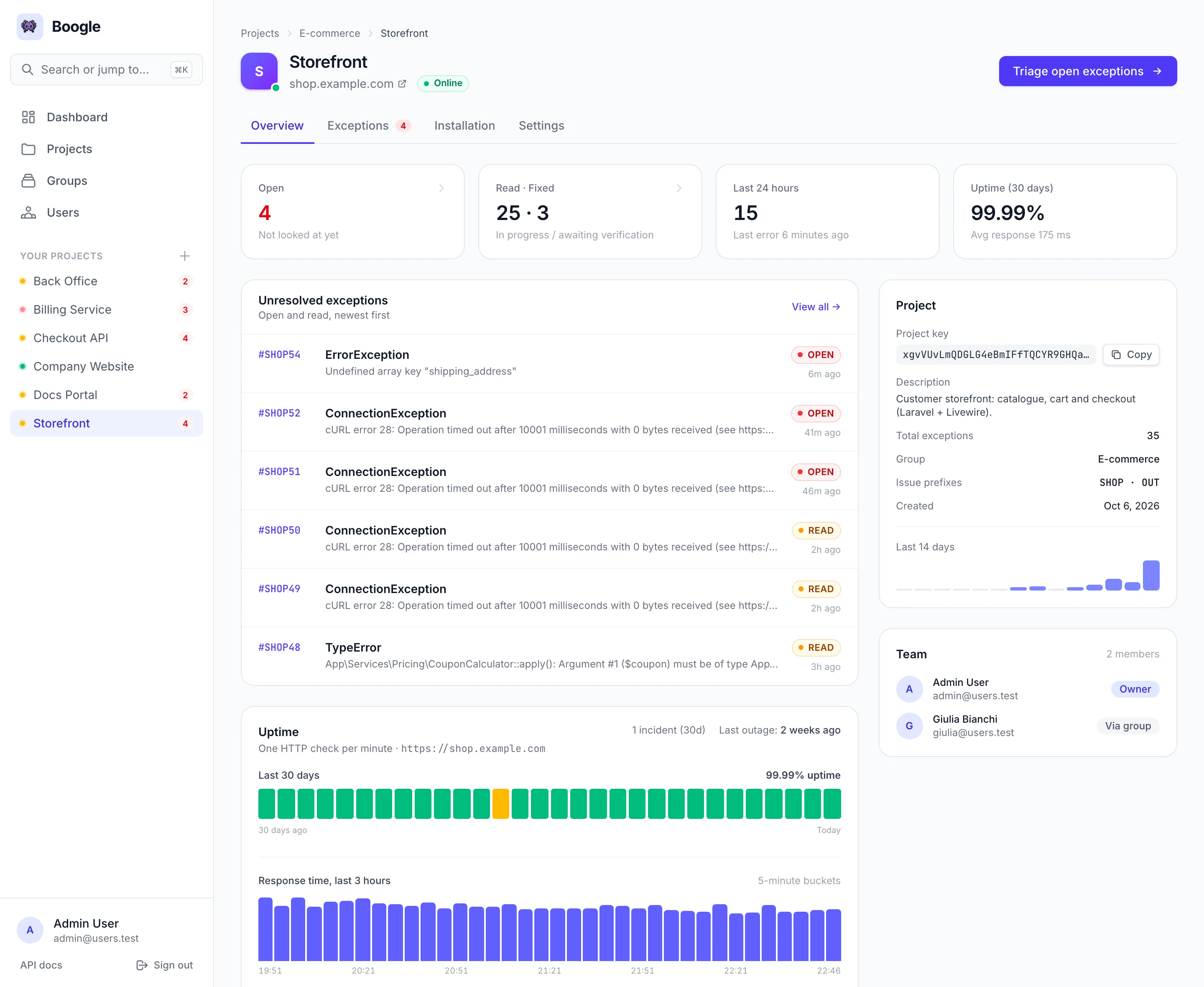
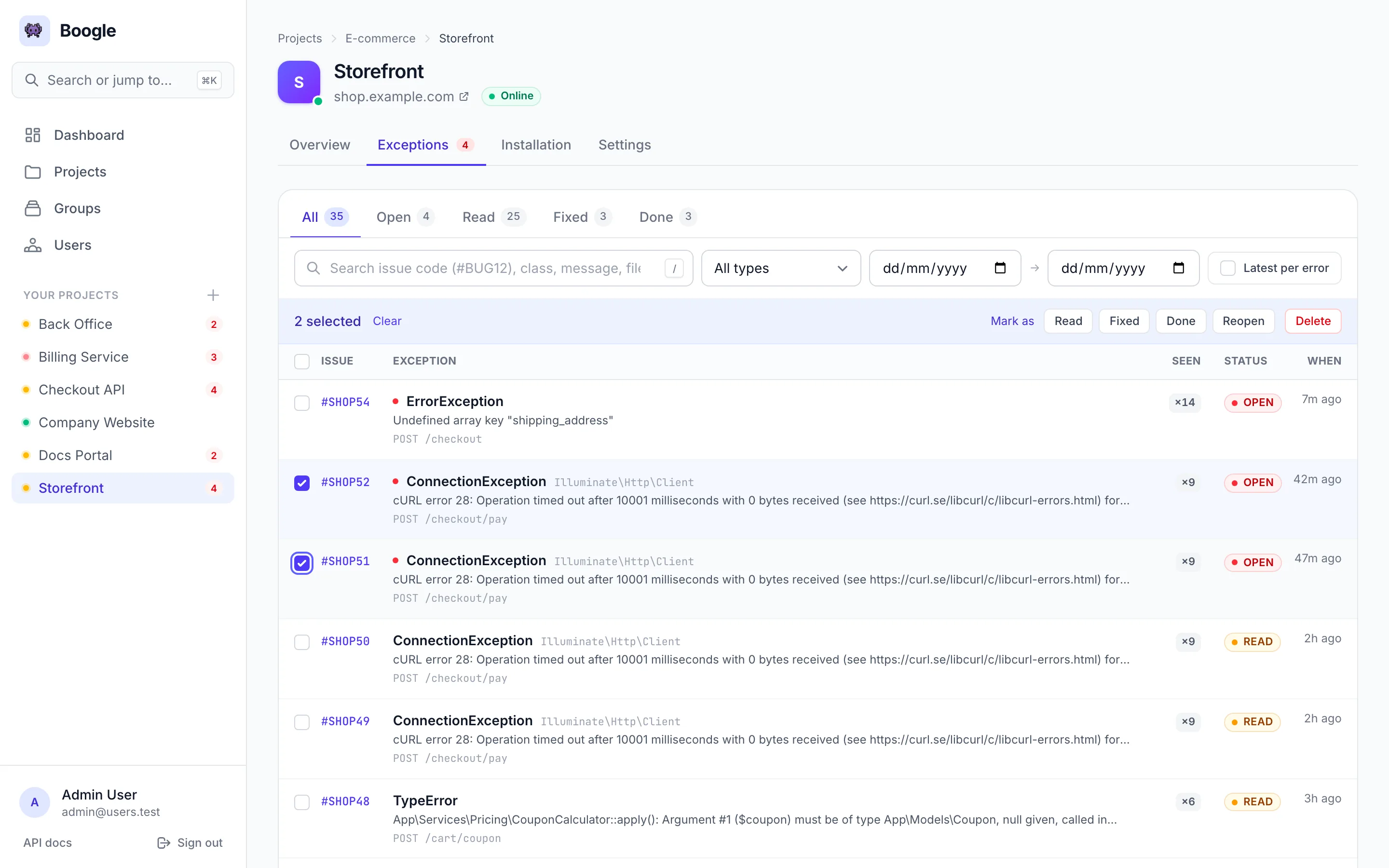
Status tabs with live counts, search by issue code, class, message, file or URL, filters that apply as you change them, and a Seen ×N counter for repeated errors. Toggle Latest per error to collapse duplicates.
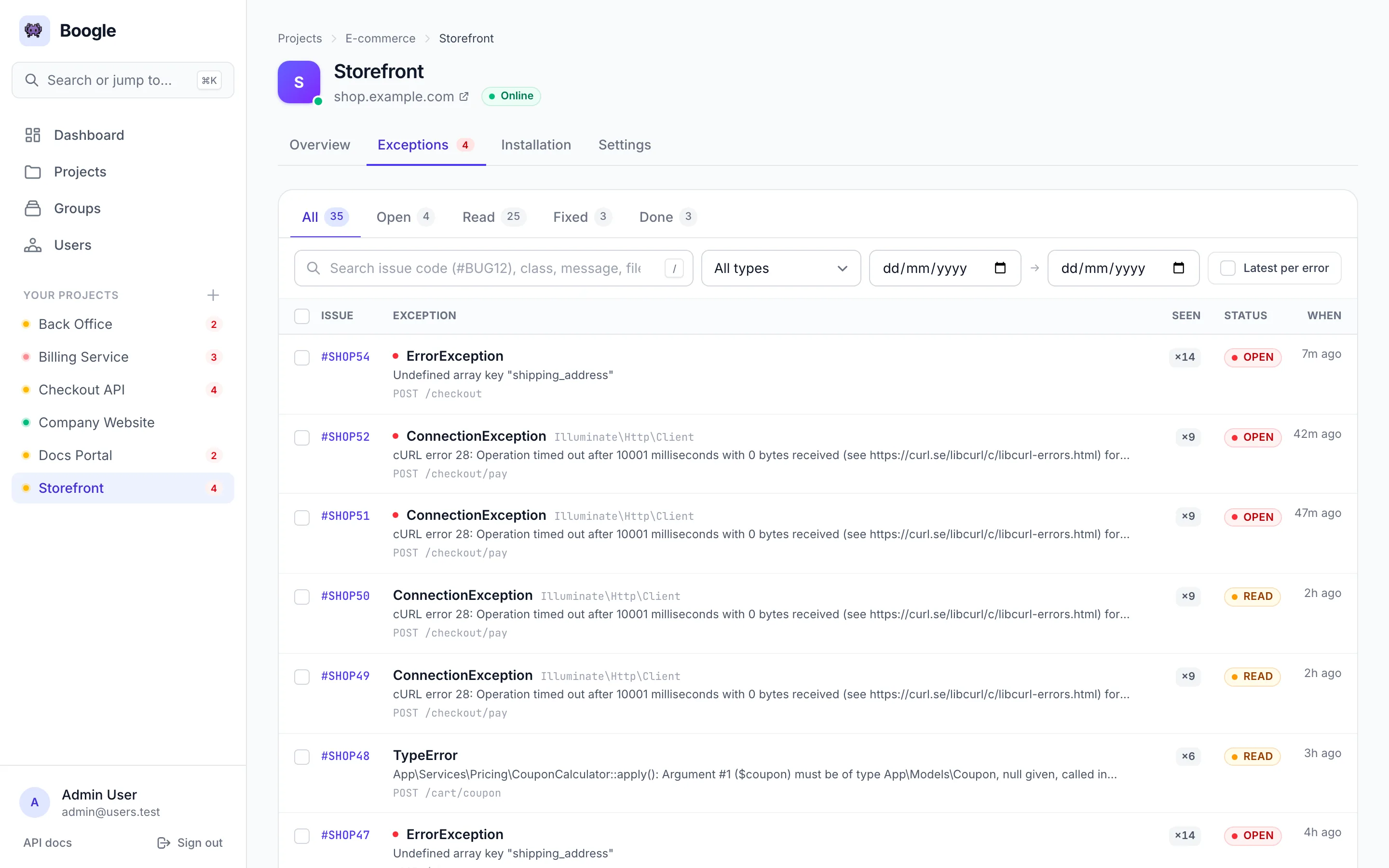
Select rows to mark them Read, Fixed or Done, reopen or delete them in bulk:
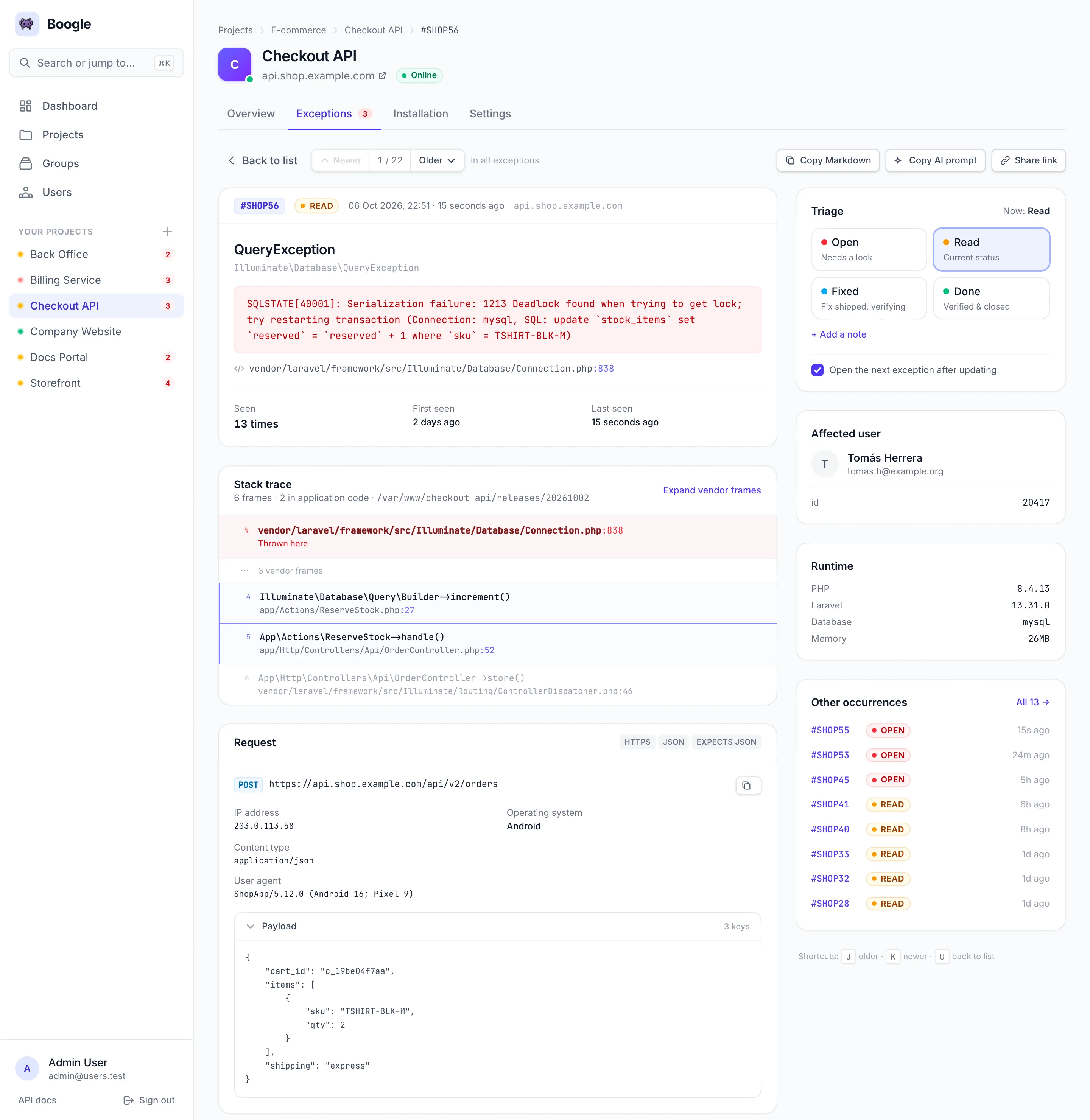
Application frames are highlighted and vendor frames collapsed. The request, client, affected user and runtime are laid out instead of dumped as JSON. Set the status from the sidebar, add a note, and Boogle opens the next exception of the list you came from. Copy the whole thing as Markdown or as an AI-ready prompt.
| Shortcut | Where | Action |
|---|---|---|
| ⌘K / Ctrl K | Everywhere | Open the command palette |
| / | Lists | Focus the search box |
| J / K | Exception detail | Older / newer exception in the current list |
| U | Exception detail | Back to the list, filters preserved |
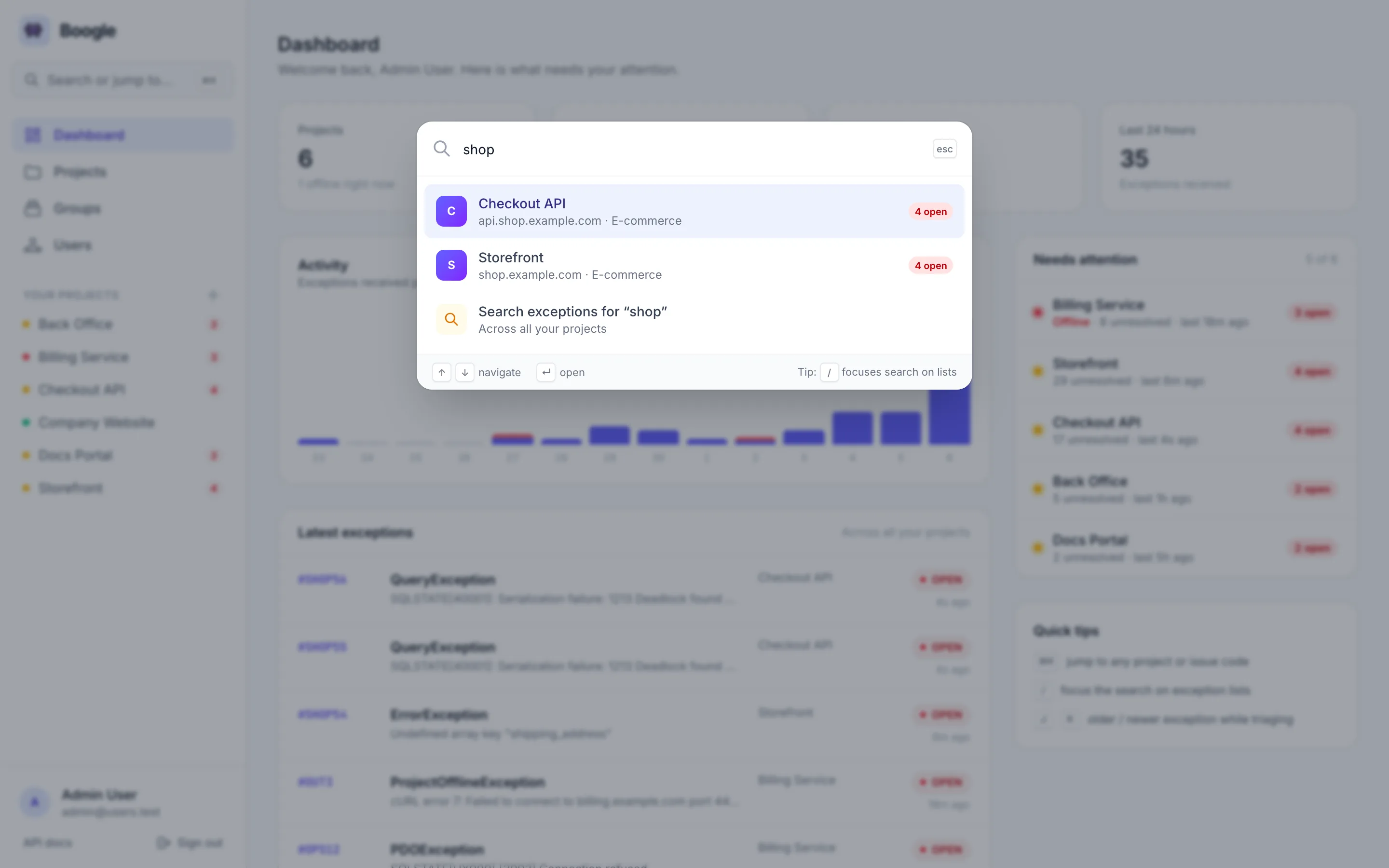
Press ⌘K to search projects, pages and exceptions. Type an issue code such as
#OUT3 and Boogle opens it directly.
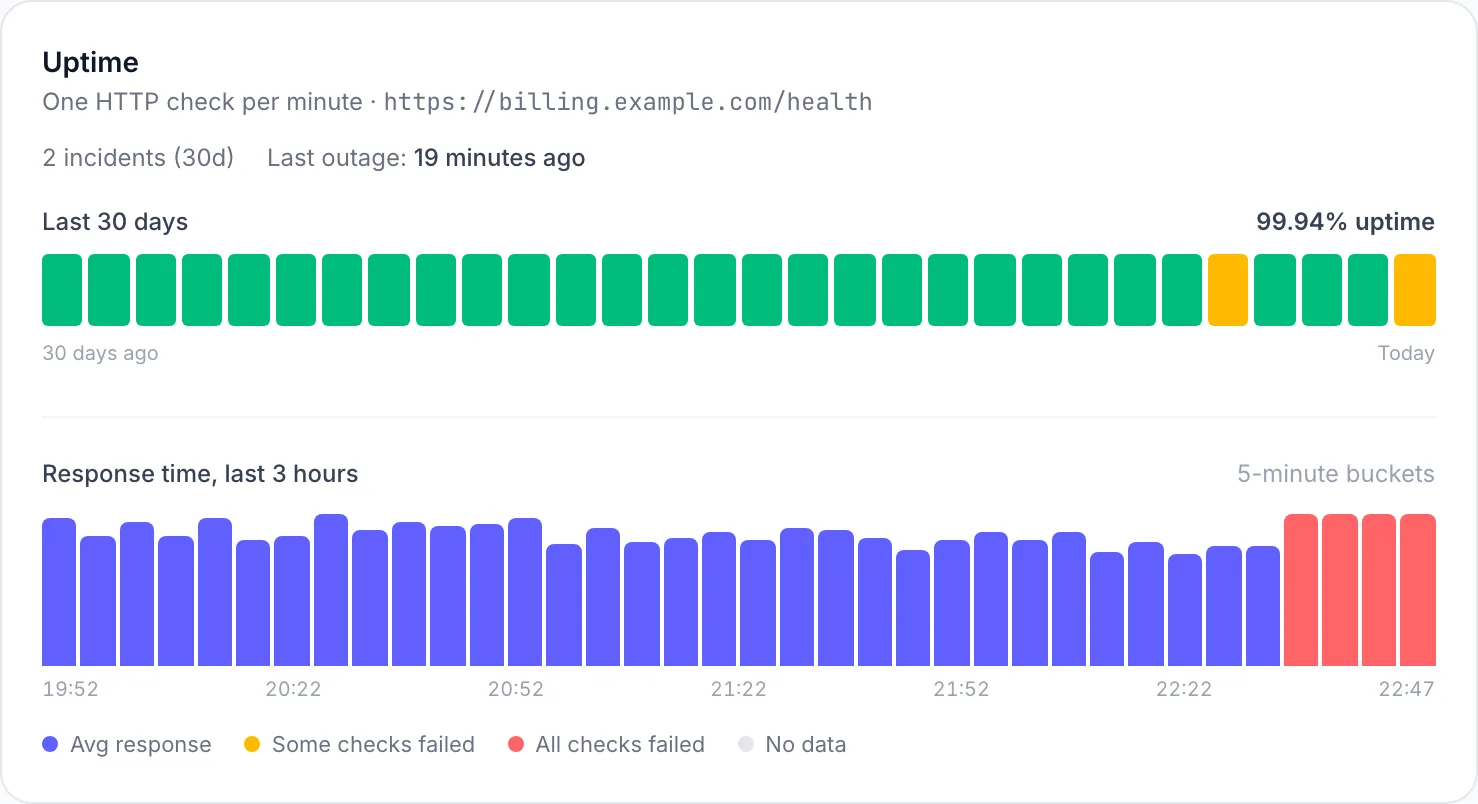
One check per minute, 30 days of daily bars and a 3-hour response time chart. This project has been offline for the last few minutes — the outage issue opened itself and will close itself on recovery.
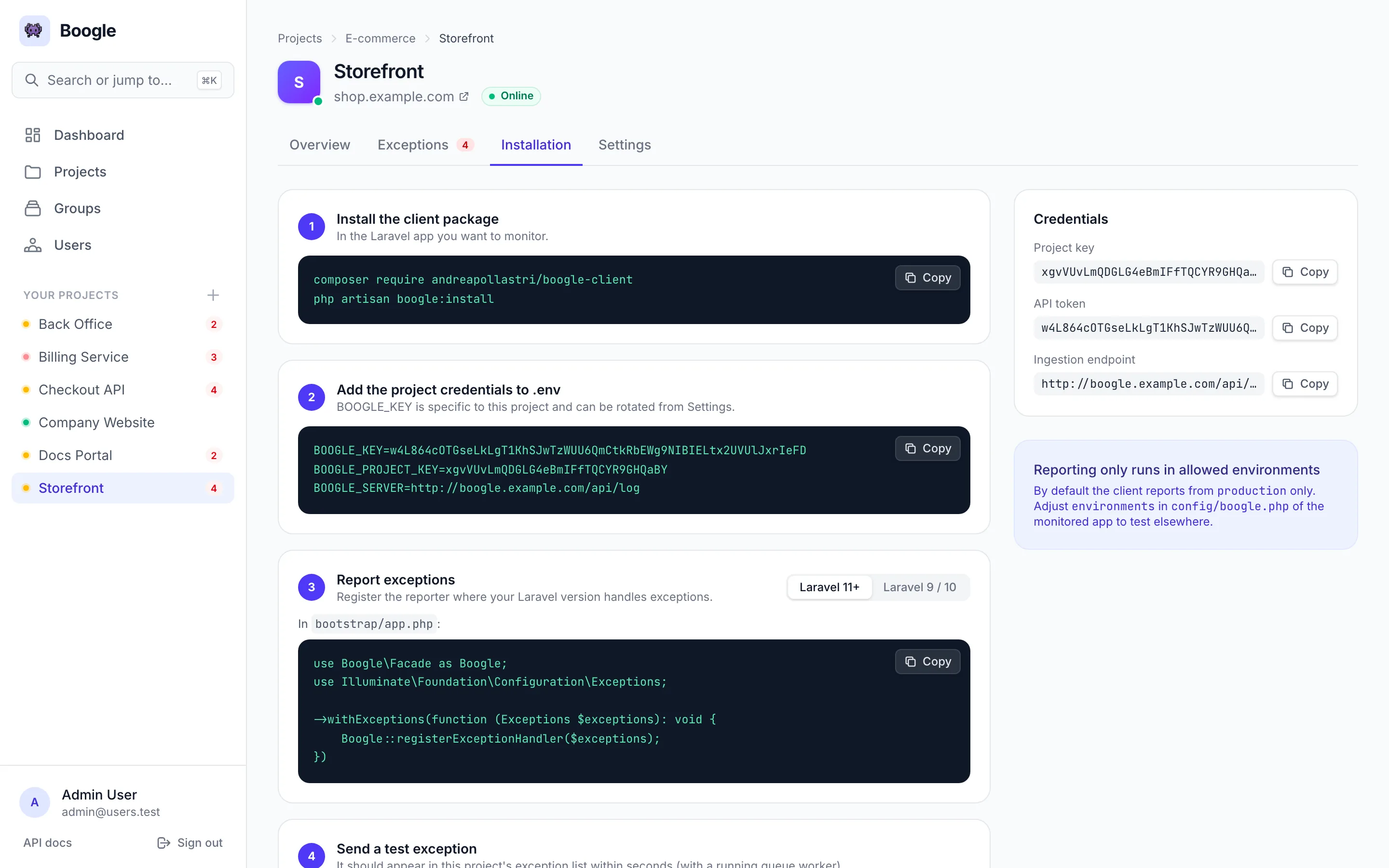
The installation tab shows the exact .env block for the project, with copy buttons for every
command and snippet for Laravel 11+ and 9/10.
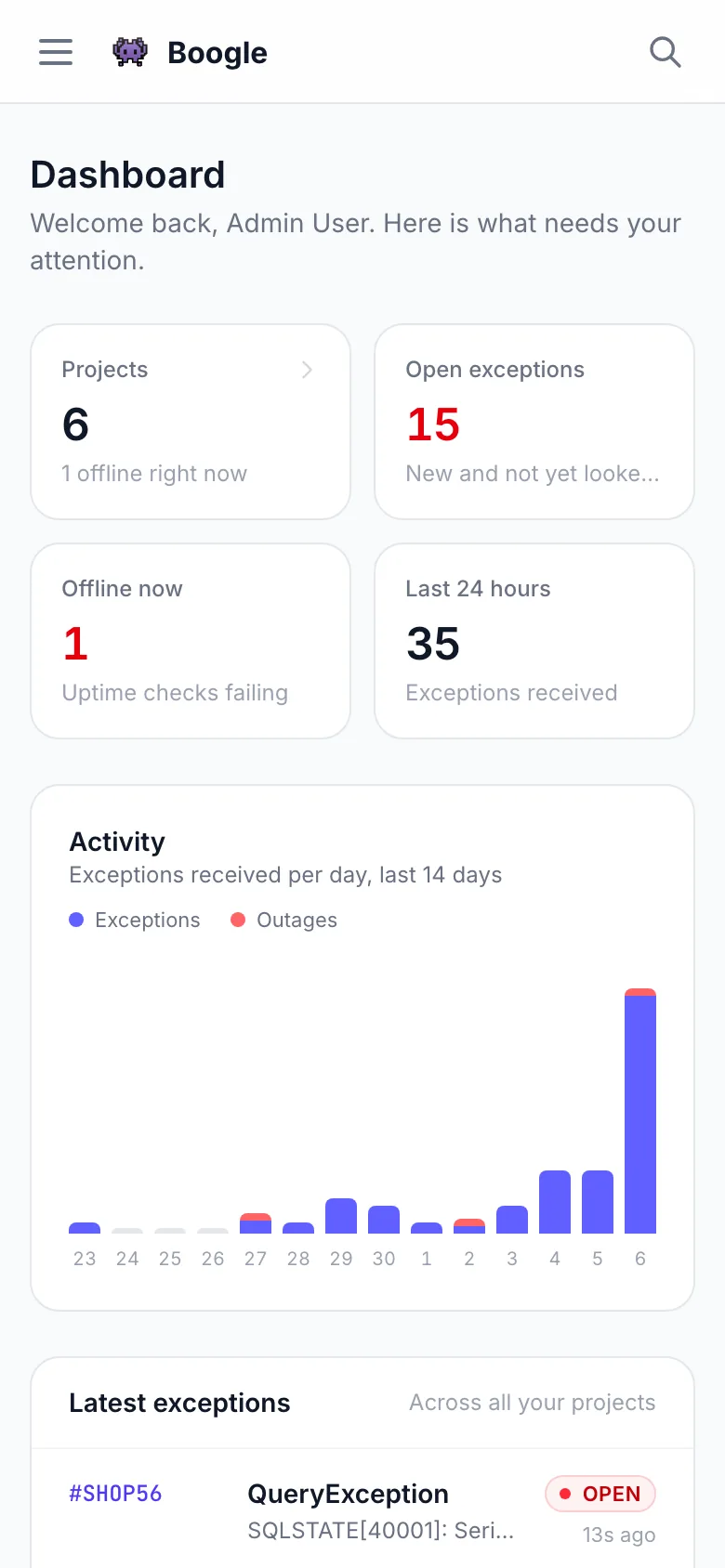
The panel works at phone width, with the same search button in the top bar.
PHP 8.3+, Composer, and Node. Any SQL database Laravel supports.
git clone https://github.com/andreapollastri/boogle.git
cd boogle
composer run setup
The setup script installs Composer deps, creates .env, generates the app key,
migrates, installs npm packages, and builds assets.
composer install
cp .env.example .env
php artisan key:generate
php artisan migrate --force
npm install --ignore-scripts
npm run build
composer test
The suite runs on an in-memory SQLite database: ingestion, access control, triage, filters, search and uptime checks.
From zero to a running panel in three steps.
Clone the repo, run composer run setup, then start the stack with
composer run dev.
Default seeder admin: admin@users.test / password. Change the password right
away from Profile.
Add a project, open Installation for key + token, then wire a client app (next section).
composer run dev
Starts the web server, queue listener, log tail, and Vite. For scheduler locally, also run
php artisan schedule:work.
Want to see a lived-in instance before wiring your apps? Seed the bundled demo.
php artisan migrate:fresh --seed --seeder=DemoSeeder
It creates six projects in three groups (with #SHOP, #OPS and #BUG
prefixes), five users, about eighty exceptions in the boogle-client payload format with status
history and notes, past and ongoing outages, and 30 days of per-minute uptime checks. Sign in as
admin@users.test / password.
migrate:fresh wipes the database. Every project, person and domain in
the demo is fictional (example.com), so don't leave the scheduler running against it — the uptime
checks would flag every project as offline.
Send exceptions from another Laravel application into this Boogle instance.
composer require andreapollastri/boogle-client
php artisan boogle:install
Set env vars from the project Installation page:
BOOGLE_KEY=<project_api_token>
BOOGLE_PROJECT_KEY=<project_key>
BOOGLE_SERVER=https://your-boogle-host.example/api/log
In bootstrap/app.php:
->withExceptions(function (Exceptions $exceptions) {
    Boogle::registerExceptionHandler($exceptions);
})
In app/Exceptions/Handler.php register():
$this->reportable(function (Throwable $e) {
    Boogle::handle($e);
});
| Laravel | Where |
|---|---|
| 11+ | bootstrap/app.php → withExceptions |
| 9 / 10 | Handler::register() → reportable |
Verify with:
php artisan boogle:test
key + token + full exception
object. Boogle stores it in raw_exception and maps http / user for the
panel.
Each project can ping a URL and open an outage issue when it fails.
uptime_enabled — turn monitoring on or offuptime_url — optional; falls back to the project urlOn failure Boogle records a ProjectOfflineException and emails. When the service returns, the
issue moves to DONE and a recovery mail is sent. The project chart shows the last 30 days.
php artisan projects:check-uptime
Base path /api/admin. Auth: Bearer <sanctum-token> from an admin
user.
POST /api/log (project key + token, no admin bearer)Interactive docs: /api/docs. Spec file: public/openapi.json (API v1.3.0).
Create tokens from the panel profile page.
One cron entry drives digests, uptime checks, pruning, and updates.
* * * * * cd /path-to-boogle && php artisan schedule:run >> /dev/null 2>&1
| Command | Schedule | Purpose |
|---|---|---|
exceptions:send-digests |
Every minute | Email digests for open issues |
projects:check-uptime |
Every minute | Ping project URLs / outage issues |
exceptions:prune-old |
Daily 04:00 | Delete exceptions older than 24 months |
app:update pending |
Every minute | Start the update an administrator asked for (Updates) |
app:update apply --auto |
Daily 04:00 | Nightly update, while automatic updates are on (time: APP_UPDATE_TIME) |
Boogle keeps itself on the newest build of its channel, with a database backup and rollback.
Administrators find Updates in the panel sidebar: the installed release, the newest build of the channel, Check now, Update to …, Force update, the channel and the nightly update.
1.2.3; v1.2.3 and 1.2
work too) and nothing in betweenmain, for a server you test onUpdates run every night at APP_UPDATE_TIME (04:00 by default) while automatic updates are on;
one asked for on the page starts within a minute. Both start from the scheduler, so
the cron entry is required.
Each update backs up the database (SQLite, MySQL/MariaDB, PostgreSQL; the newest 5 are kept in
storage/app/updates/backups), installs the build, runs composer install --no-dev,
builds the assets only when the release does not carry public/build, migrates, rebuilds the
caches, restarts the queue workers and checks that Boogle boots. If a step fails, the previous code and the
database come back; the log is on the page and in storage/app/updates/update.log.
| Installation | How it is updated |
|---|---|
Git checkout (git clone, as in Install) |
In place: maintenance mode, detached checkout of the new build, build, migrations. Tracked files changed by hand stop the update; Force update discards them. |
Releases of a deploy: releases/, current, shared/ (Cipi,
Deployer) |
The build goes into releases/<build> next to the running one, shares its
.env and storage, is built and migrated, then current points at
it; Cipi's workers restart. A later cipi deploy keeps working. |
The scheduler's user runs the update: it needs git, composer (npm when
assets are built) and the database client tools (mysqldump/mysql,
pg_dump/psql) on its PATH, and write access to the application.
php artisan app:update status          # the last check and the last run (JSON)
php artisan app:update check           # what the channel would install
php artisan app:update apply [--force] # update now
php artisan app:update channel stable  # or beta
php artisan app:update auto off        # or on
| Variable | Notes |
|---|---|
APP_UPDATES |
On in production; false turns updates off |
APP_UPDATE_REPOSITORY |
Where builds come from (default: this GitHub repository) |
APP_UPDATE_CHANNEL |
stable or beta until an administrator picks one (default stable) |
APP_UPDATE_AUTO |
Nightly update on or off until an administrator switches it (default true) |
APP_UPDATE_TIME |
When the nightly update runs, app timezone (default 04:00) |
APP_UPDATE_BACKUP |
Database backup before each update (default true) |
APP_UPDATE_ASSETS |
Build the assets when a release does not carry them (default true) |
APP_UPDATE_PHP / _COMPOSER / _NPM / _GIT |
Tool paths, when the scheduler's PATH does not have them |
git pull plus the production steps, or
cipi deploy). From then on Boogle updates itself.
Deploy without surprises. Cache config, keep the queue and scheduler running.
php artisan migrate --force
php artisan config:cache
php artisan route:cache
php artisan view:cache
php artisan queue:work --sleep=3 --tries=3 --timeout=120
| Variable | Notes |
|---|---|
APP_URL |
Public HTTPS URL of this Boogle instance |
APP_ENV / APP_DEBUG |
production / false |
MAIL_* |
Required for digests and uptime alerts |
QUEUE_CONNECTION |
Use database, Redis, or similar — keep a worker online |
BOOGLE_UI_SHOW_HTTP_HEADERS |
Optional panel privacy (default true) |
BOOGLE_UI_SHOW_HTTP_SESSION |
Optional panel privacy (default true) |
queue:work restarts automatically. See the GitHub README for sample unit files.
Later releases install themselves from the scheduler: see Updates for what the scheduler's user needs.
Run Boogle on any Ubuntu VPS with cipi.sh — PHP-FPM, MariaDB, Nginx, Let's Encrypt, zero-downtime releases, and queue workers.
Explore cipi.sh →